
How to Plan a 30-Second Wan 3.0 NSFW Video Without Overloading the Scene
On this page
Thirty seconds gives an NSFW scene time to establish its adult characters, develop an interaction, and arrive at a usable final frame. It also creates more opportunities for skipped actions, confused character roles, merged body geometry, wardrobe jumps, and a rushed ending.
A usable Wan 3.0 NSFW video therefore needs more than a longer prompt. It needs a plan for what remains fixed, what changes, and what each part of the timeline must visibly complete. This guide turns Wan 3.0’s up-to-30-second format into a practical scene plan, a copy-ready prompt structure, and a way to diagnose failures without rewriting everything.
Quick Answer: Thirty Seconds Is a Timeline, Not a Complexity Budget
Treat the 30 seconds as a sequence of controlled states. Establish the adult characters and room, then introduce one primary change at a time: an approach, a response, a pose transition, a camera adjustment, or a final hold. Keep identity, body proportions, wardrobe state, and room geography stable unless a specific beat changes them.
A useful planning rule is:
One beat should have one narrative job, one primary change, one dominant camera instruction, one audio priority, and one visible end state.
This is not a hard Wan 3.0 limit. It is a practical way to reduce instruction competition. A simple beat can sometimes contain several small movements, while a difficult two-character pose may need an entire beat. Complexity should follow what the model must keep spatially and anatomically coherent, not how many sentences fit in the prompt.
What Overloading an NSFW Scene Actually Means
An overloaded prompt is not necessarily a long prompt. It is a prompt that asks too many important things to change at the same time.
Consider a six-second segment in which Character A crosses the room, removes an item of clothing, turns toward Character B, changes pose, delivers a line, and maintains eye contact while the camera circles both characters. Every instruction is understandable on its own. Together, they compete for the same seconds and the same frames.
NSFW scenes are especially sensitive because their continuity depends on relationships, not isolated objects. Wan must track where each character is, who initiates an action, which hand belongs to whom, how two bodies overlap, what remains visible, and what clothing state carries into the next moment. A camera move that would be harmless in a landscape shot can hide a handoff or change the apparent body relationship in an intimate scene.
The most common overload comes from interacting dimensions: characters, locations, action chains, body and contact geometry, wardrobe state, visibility, camera direction, audio, and references. The prompt becomes fragile when several change inside the same beat.
Choose the Production Route Before Writing the Prompt
Choose the structure that matches the control the scene needs.
Use One Continuous Take When Continuity Is the Main Attraction
A continuous take works best with one room, one or two adult characters, a simple progression, and one motivated camera path. Keep the environment, identities, and visual treatment stable, and write one continuous take to reduce unplanned cuts.
Use One Timestamped Multi-Shot Generation When the Scene Needs Visual Coverage
Use this route when one compact event needs an establishing view, reaction, closer detail, and final composition. Change the framing, not the cast, location, wardrobe, style, and action logic at every cut.
Use Separate Generations When Precision Matters More Than Single-Pass Continuity
Split the production for several exact pose transitions, substantial clothing changes, multiple locations, precise contact geometry, or an indispensable frame. Generate shots separately, preserve an approved state between them, and assemble the sequence in editing.
The starting mode should follow the production decision:
- Use T2V when visual interpretation can remain flexible.
- Use Wan Image-to-Video when an approved opening image defines the characters, room, composition, and starting pose.
- Use first-and-last-frame control when the opening and ending compositions both matter more than the exact path between them.
- Use Wan Reference-to-Video when identity, location, style, motion, or audio comes from separate reference assets.
Treat first-and-last-frame control and multi-reference generation as alternative routes unless the specific interface explicitly supports combining them. They solve different planning problems and should not be assumed to stack.
Plan the Final State Before Filling the Timeline
The ending should be a production decision, not whatever remains after the prompt runs out of instructions.
Write one sentence describing what must be visible at the end of the video. Identify each character’s position, the final pose, wardrobe state, camera distance, and whether the frame should hold. The description must be visual enough that a reviewer can point to the result and say whether it happened.
Weak final goal:
End in a sensual, cinematic mood.
Usable final state:
Character A is seated at the edge of the bed facing camera left; Character B stands behind her with both faces visible. The camera settles into a stable medium shot and holds the pose briefly; two seconds is a practical editing guideline, not a Wan 3.0 requirement.
Once the end state is fixed, work backward. Ask which action must finish before that pose, where both characters must be at the start of the final beat, and how much time the camera needs to settle. This protects the ending from being compressed by an overlong setup.
Build an NSFW Scene Load Map
Before assigning timestamps, audit the creative idea across the dimensions Wan must manage. Do not convert the audit into a fake numerical score. Its purpose is to expose competing changes.
Adult Characters
Count the identities Wan must track and differentiate. Use stable labels such as Character A and Character B, supported by distinct hairstyles, wardrobe colors, silhouettes, or accessories.
Body and Contact Geometry
Record world positions, facing direction, and important points of contact. Keep anchors such as beside the bed across the scene, but define screen left and right per shot because a new angle can reverse them. State who approaches, who remains still, and where each person ends.
Pose Transitions
List the required poses and transitions in order. Standing, turning, changing orientation, and settling into another pose form a dependency chain; one failed transition can make every later state incorrect.
Wardrobe and Appearance State
Set the global appearance and name the only beat responsible for a change. Record its resulting wardrobe state and carry that state forward.
Visibility and Occlusion
Check whether faces, hands, limbs, and the body relationship remain readable. Furniture, crossed limbs, close framing, and overlap increase ambiguity.
Aspect ratio matters too. A vertical frame suits one standing character but can crop two-person full-body movement. Wider framing or a smaller subject scale may create more useful motion space than extra anatomy instructions.
Camera and Framing
Give the camera one job: establish the room, follow an approach, reveal a response, or settle on the final pose. Do not stack unrelated camera moves inside one short segment.
Dialogue and Audio
Read dialogue aloud before assigning it to a beat. Dialogue, action sound, ambience, and music can coexist, but one layer should lead each important moment.
Reference Roles
More references do not automatically add control. Use original fictional adult characters or adult reference material you have permission to use. Give every image, video, and audio input one job, and remove assets that duplicate or contradict another reference.
A beat becomes high-risk when several major dimensions change together, especially when body geometry, camera movement, wardrobe state, and dialogue depend on one another. A new pose, location, camera direction, wardrobe state, and speaker should not all arrive together unless the result can tolerate significant interpretation.
After the audit, separate global anchors from beat-level changes. Identity, proportions, wardrobe state, room geography, lighting, and visual treatment remain global. Action, expression, framing, dialogue, and end position belong to individual beats. This prevents every timestamp from redefining the scene.
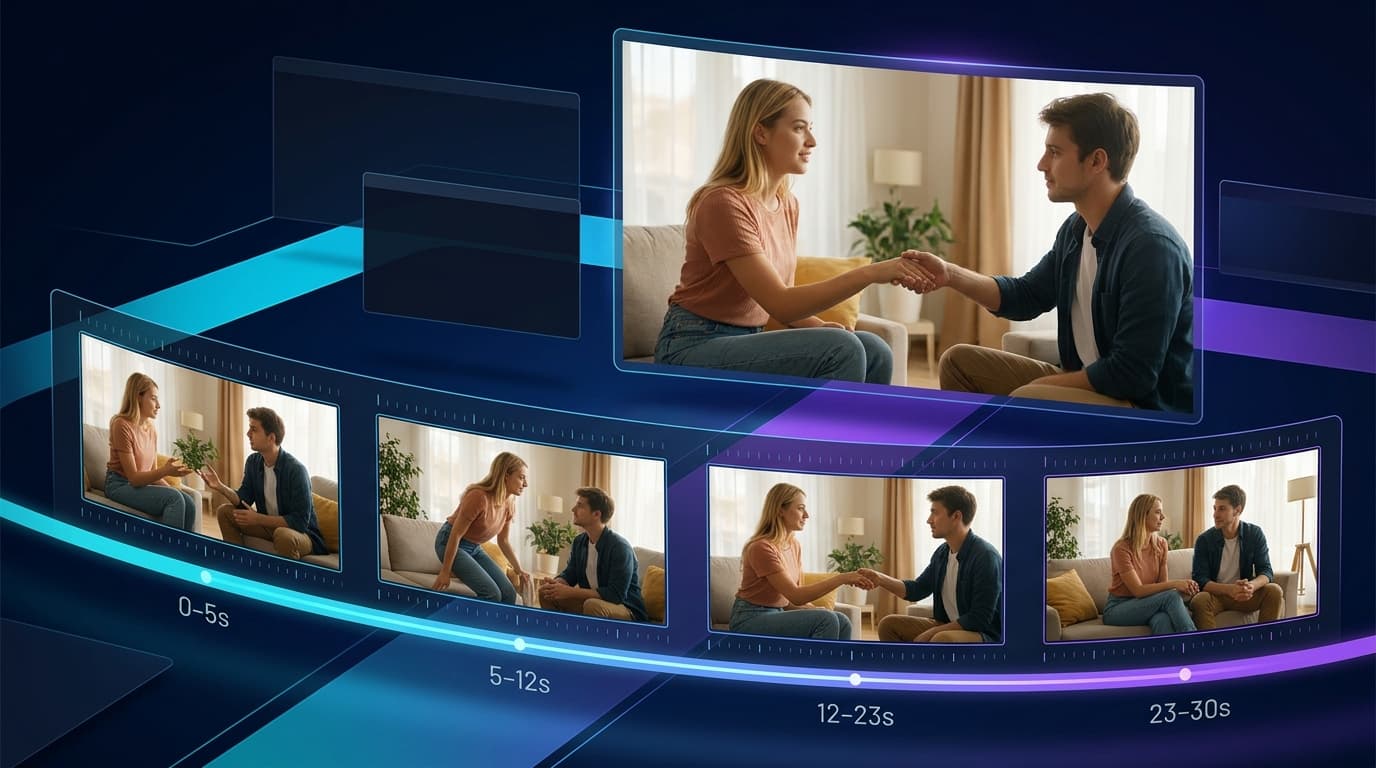
Turn the Idea Into a 30-Second Planning Sheet
Plan the video before turning it into prose. A simple worksheet makes missing states and overloaded beats visible.
| Time | Narrative Job | Start State | Primary Change | Camera Job | Audio Priority | Visible End State |
|---|---|---|---|---|---|---|
| 0–5s | Establish | Both characters visible in the room | Character B enters the active space | Stable wide or medium-wide frame | Room ambience | Identities, positions, and room are readable |
| 5–12s | Approach | Characters separated | Character A approaches Character B | Slow track or push | Footsteps or restrained music | Both stop in a defined relative position |
| 12–23s | Develop | Contact position established | One controlled interaction or pose transition | One closer framing change | One dialogue or action-audio priority | The primary action is complete |
| 23–30s | Complete and hold | Final transition already underway | Settle into the intended ending | Camera stabilizes | Audio resolves | Final pose remains readable for review and editing |
This is not a required ratio. A narrative beat is a story task and may last 5–12 seconds; a shot is one continuous camera segment. For a multi-shot Wan 3.0 prompt, divide larger beats into consecutive shots, commonly around 2–5 seconds each.
Each beat still needs a contract: a visible start state, one primary event, a camera job, and an end state. The end state then becomes a continuity handoff for the next beat.
For example:
Beat 2 ends with Character A beside the sofa and Character B near the window, facing Character A. Beat 3 begins from those world positions. Character B remains still while Character A completes the next movement; the new shot defines their on-screen left-right placement.
This reduces ambiguity while separating body movement from camera movement. Treat timestamps as pacing guidance, not frame-accurate edit points. If exact timing is non-negotiable, create separate shots and control it in post-production.
Write the Wan 3.0 Prompt in Two Layers
After the planning sheet is stable, convert it into a global brief followed by shorter timed shots. The prompt should read like a compact production plan, not a collection of disconnected visual adjectives.
Continue from Shot 1. Character A [one movement]; Character B [one response or remains still]. Use [one camera instruction]. End with [observable position].[SHOT 3: 8-12s — COMPLETE THE APPROACH]
Begin from the previous positions. Complete the approach without changing identity, wardrobe, or room geography. End with [relative body orientation and gaze].
[SHOT 4: 12-17s — BEGIN THE PRIMARY INTERACTION]
Character A [specific action]; Character B [specific response]. Keep both faces and the intended body relationship readable. End with [visible intermediate state].
[SHOT 5: 17-22s — DEVELOP]
Continue from Shot 4. Complete one additional movement or reaction. Keep the action axis and character roles clear. End with [completed interaction state].
[SHOT 6: 22-26s — FINAL TRANSITION]
Move only into the final pose. Use [one framing change]. End with both characters in [precise world positions].
[SHOT 7: 26-30s — SETTLE AND HOLD]
The camera settles into [shot size]. Final state: [pose, wardrobe state, gaze, framing, and visible body relationship]. Hold the readable final state through the end.
[AUDIO]
[Dialogue with named speaker, or no dialogue]. [Primary ambience or action sound]. [Music direction, or no background music].
[CONTINUITY]
No identity swapping, unexplained wardrobe changes, room-layout changes, position reversals, extra characters, or competing camera moves.
Do not fill every bracket merely because it exists. Skip controls that do not matter. The template is valuable because it separates decisions; it becomes harmful if it encourages another form of instruction overload.
Before generating the full 30 seconds, use Wan 3.0 Video Generator to test the most difficult 8–10-second section first. Confirm identity, spatial relationships, and motion before restoring secondary actions and expanding the complete timeline.
Overloaded vs. Controlled: Rebuild the Same 30-Second Idea
Consider a two-character adult teaser in a hotel suite. Both versions below describe the same creative intention, but only one establishes priorities.
Overloaded Version
Create a 30-second sensual hotel-suite scene. Character A starts at the vanity, changes wardrobe, walks to Character B beside the bed, whispers two lines, moves into several intimate poses, then leads Character B to the balcony.Alternate close-ups and full-body shots while the camera pushes in, circles them, racks focus, and becomes handheld. Rain moves across the windows, curtains blow, lights dim, music builds, both characters breathe audibly, and the video ends in an elegant pose with the skyline behind them.
The prompt asks the scene to change location, wardrobe, pose, speaker, camera system, lighting, and audio emphasis while preserving two identities and an exact ending.
Controlled Version
Create a 30-second cinematic adult teaser with Character A and Character B in one hotel-suite bed area. Keep both identities, wardrobe states, furniture positions, and warm window lighting stable.Shots 1-2 [0-8s]: Establish both characters and the room. Character A stands beside the vanity; Character B waits beside the bed. One stable medium-wide camera.
Shots 3-4 [8-17s]: Character A crosses the short distance and stops in front of Character B. Character B remains beside the bed and turns to face her. Slow push-in only.
Shot 5 [17-22s]: Character A initiates one close interaction; Character B gives one clear response. Both faces remain visible.
Shots 6-7 [22-30s]: They complete one final pose beside the bed. The camera settles into a medium shot and holds the result through the end. One short line from Character A; quiet rain ambience; no music.
The revision removes the balcony, mid-scene wardrobe change, competing camera moves, and second dialogue line. It moves the final pose earlier so it can settle. It locks the room, identities, wardrobe, and lighting.
If the balcony and wardrobe transition are essential, split them into separate clips, then connect them in editing or extend from an approved ending frame.
Run a Prompt Subtraction Pass
Before generating, spend five minutes removing instructions. This is often more useful than another round of expansion.
- Delete static details already established by the input image.
- Remove any secondary action that does not change the story.
- Keep one dominant camera instruction per beat.
- Shorten dialogue until it fits comfortably inside its segment.
- Remove a reference if another asset already performs the same job.
- Replace mood-only endings with visible final states.
- Move exact but nonessential details out of the first test.
Then read only the verbs. If several people, garments, props, lights, and camera systems all change in the same time range, the beat is still overloaded.
Diagnose the Result Before Rewriting Everything
Do not answer every failed generation by adding more instructions. Identify the failure class first and change one variable.
| What You See | Check First | First Revision |
|---|---|---|
| A required action disappears | Too many actions share one beat | Keep the primary action and move the rest to another beat |
| Character identities swap | Labels, appearance anchors, or references compete | Keep one primary identity reference per character and strengthen visible differences |
| Limbs or body contours merge | Heavy overlap, occlusion, or simultaneous full-body motion | Simplify the contact geometry or use a wider, clearer framing |
| One character performs the other’s action | The subject-action binding is vague | Repeat the character label before every dependent action |
| The pose transition never completes | The action chain is longer than the available time | Remove an intermediate pose or give the transition its own beat |
| Wardrobe changes unexpectedly | Several appearance states are implied | Define one global state and name the only beat allowed to change it |
| The room resets between shots | Location and positions are not anchored | Restate room layout and carry the previous end positions forward |
| Camera motion feels erratic | Multiple camera instructions compete | Keep one camera job and describe the visible result it should create |
| Dialogue is cut off or rushed | The line exceeds the beat’s speaking time | Shorten it, slow the visual action, or move it to a separate shot |
| The final pose appears for an instant | The preceding action consumes the ending | Finish the action earlier and reserve a clear final hold |
| The second half drifts | Too many unresolved state changes accumulate | Reduce earlier changes and make each handoff explicit |
Review failures in this order: event order, character identity, spatial relationship, motion completion, camera, then audio and polish. There is little value in perfecting music when the characters have changed places or the primary interaction never completed.
If the same structural failure survives two focused revisions, reconsider the production route. A difficult scene may need an approved keyframe, a simpler I2V pass, or separate shots. Changing the route is often more efficient than continuing to patch a fundamentally overloaded prompt.
Decide Whether the Video Is Production-Ready
Review the result as usable footage, not only an attractive generation:
- Can a viewer understand the event order without reading the prompt?
- Are both adult characters recognizable throughout?
- Do body positions and contact relationships remain plausible?
- Does every important action visibly finish?
- Are wardrobe and room states continuous?
- Does the camera reveal rather than hide the primary action?
- Does the audio support the scene without competing with it?
- Are the opening and ending frames clean enough to edit or extend?
A minor visual imperfection may be editable. The wrong action, swapped identities, or an unreadable ending usually is not.
Final Takeaway: Plan Changes, Not Just Descriptions
The best 30-second Wan 3.0 NSFW prompt makes priorities visible. Lock the identities, room, and appearance that must survive. Give each beat one important change, carry its completed state forward, and protect the ending before filling the middle.
Once the scene passes the load check, use Wan 3.0 Video Generator to test the timeline. Review the result by failure class, revise one variable, and split the production when exact control matters more than completing everything in one generation.