
Quick Answer
Qwen-Image 2.1 is a unified image-generation and editing model that can create new images, combine visual references, preserve recognizable subjects during edits, and modify selected regions without rebuilding the entire composition.
Its most useful role in a Wan workflow is not producing random still images. It is turning reusable character and location assets into images designed for a specific video shot. A character reference can be combined with an approved setting, placed into the required pose, and refined into a clear opening frame before Wan adds motion.
This matters even more in an NSFW Wan workflow. Unclear anatomy, overlapping characters, conflicting references, or a poorly staged starting pose usually become harder to repair after movement begins.
The practical pipeline is:
Master character and scene assets → Qwen-Image 2.1 editing → shot-ready image → Wan I2V keyframe or Wan 3.0 R2V reference
The Four-Step Qwen-to-Wan Workflow
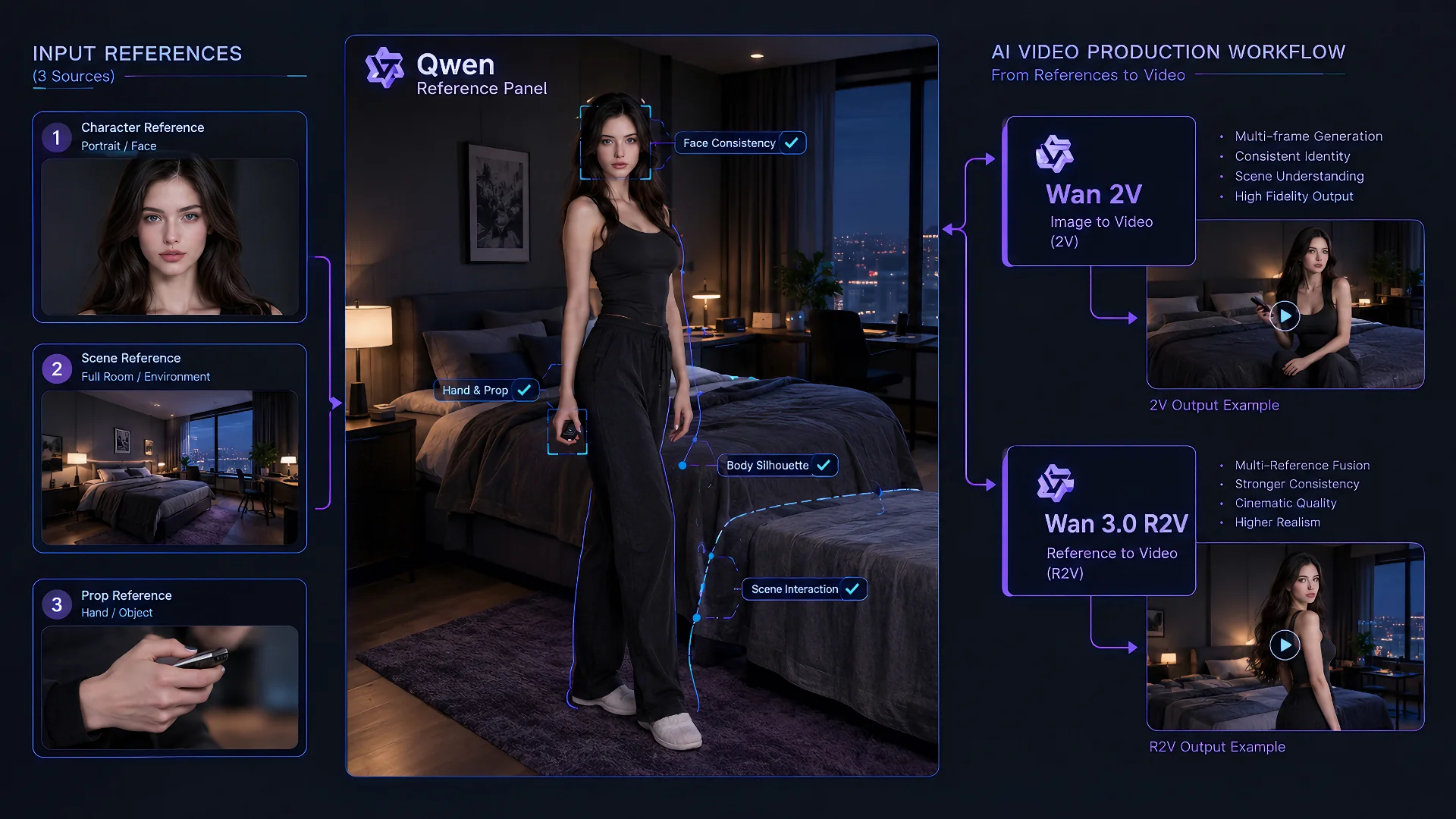
- Choose the source assets. Start with the smallest useful set of approved character, clothing, location, pose, and prop references.
- Build the shot in Qwen. Combine those assets into the required composition, then repair local problems without changing the parts that already work.
- Run a visual preflight. Confirm identity, anatomy, spatial relationships, movement space, framing, and aspect ratio before introducing motion.
- Choose the Wan route. Send a finished opening composition to Wan I2V. Send reusable identity, environment, or style information to Wan 3.0 R2V when the new scene may use a different composition.
What Qwen-Image 2.1 Adds to a Wan Video Workflow
Qwen-Image 2.1 combines text-to-image generation and image editing in one model. It can work with up to ten reference images, modify selected regions through masks or visual annotations, and preserve recognizable characters or objects while the surrounding image changes. It also supports native 2K output, transparent RGBA assets, typography, and multiple aspect ratios.
These capabilities address a practical problem in Wan video production: the required character, clothing, location, pose, and camera setup rarely exist in one finished image. Qwen-Image 2.1 can combine and refine those separate visual decisions before the shot enters Wan.
The important distinction is between an asset and a shot-ready frame. A portrait, location image, clothing reference, prop, or transparent cutout defines one part of the production. A shot-ready frame brings the required assets together in a readable composition with a clear subject, camera position, starting pose, and direction of movement.
This creates four practical advantages:
- Reference consolidation: combine approved character, clothing, prop, and location information into one usable image.
- Controlled variation: change a pose, expression, camera distance, or background while preserving the important visual anchors.
- Local repair: correct a hand, gaze direction, object position, or clothing detail without regenerating the entire frame.
- Reusable production assets: create character sheets, location plates, transparent subject assets, and shot variants that can support several clips.
Not every Qwen output should go directly into Wan. A character sheet may be excellent for identity reference but poor as an I2V opening frame. An RGBA cutout may simplify compositing, but transparency does not improve motion by itself. The useful output is the one whose format matches the next video task.
Build a Master Character Reference Set and Prevent Identity Drift
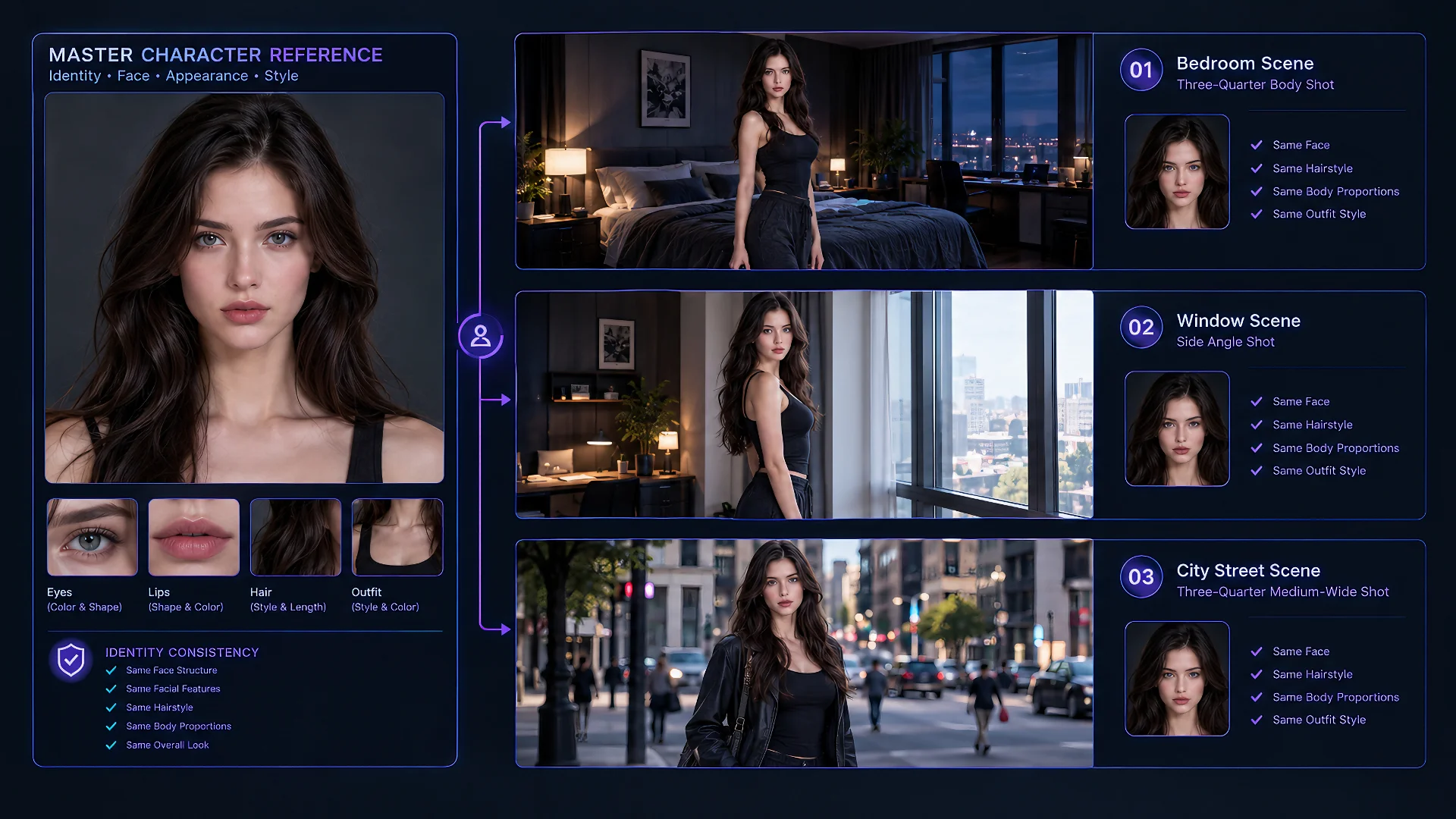
A consistent Wan sequence should begin with a master character reference set: the approved visual baseline against which every later image is judged. It does not need to be a large sheet. In many projects, a clean portrait, a three-quarter view, and one full-body image are enough to establish the information that must not drift.
The master set should make the character’s fixed traits easy to read. These may include facial structure, hairstyle, body proportions, recurring wardrobe elements, distinctive accessories, and the overall visual treatment. Expression, camera angle, pose, lighting, and temporary clothing changes belong to individual shots and should not be mistaken for permanent identity features.
Qwen-Image 2.1 is most useful when every new image branches from this approved source. Avoid building a sequence through repeated serial edits:
Image A → edit → edit again → use the edited result as the next source → edit again
Each step can quietly reinterpret the face, proportions, texture, or costume. After several generations, the final result may still look plausible but no longer resemble the approved character.
Use a branching structure instead:
Master reference → controlled variant → shot-specific keyframe → Wan
For a new camera angle, return to the master. For a wardrobe variation, return to the master. For a new location or pose, combine the master with the relevant scene or motion reference rather than using a heavily edited frame from an earlier shot.
Qwen-Image 2.1 can preserve identity during an edit, but preservation is not the same as a guarantee across an entire series. The model still has to reconcile every added reference and instruction. Identity tends to weaken when several changes are requested at once, especially when the new pose hides defining facial features, the lighting radically changes the face, or another reference contains a competing visual identity.
Keep Fixed Traits Separate From Shot Variables
Decide which details define the character and which may change. The master should carry identity. The shot brief should carry pose, action, expression, camera, and temporary styling. This prevents a one-off image from becoming the accidental new standard.
Change Fewer Variables Per Edit
If the character needs a new outfit, location, pose, and camera angle, do not assume one edit will preserve every detail equally. First build the correct composition with the approved identity and location. Then repair local details or refine styling. Fewer competing changes make it easier to see which instruction caused drift.
Compare Every Important Output With the Master
Do not judge only whether a frame looks attractive. Check whether the facial structure, hairstyle, body proportions, and signature details still match the approved references. If a frame requires several rounds of facial repair, return to the master and rebuild the branch. Continuing from a weak variation usually compounds the problem.
For scenes with more than one recurring character, keep a separate master set for each person. Combine only the references required for that shot, and make each role visually unambiguous. Similar faces, overlapping bodies, or references that show several people can cause the model to exchange clothing, expressions, or physical traits. Independent source sets make later Qwen edits and Wan references easier to diagnose.
Build Reusable Scene Assets Instead of Recreating Every Location
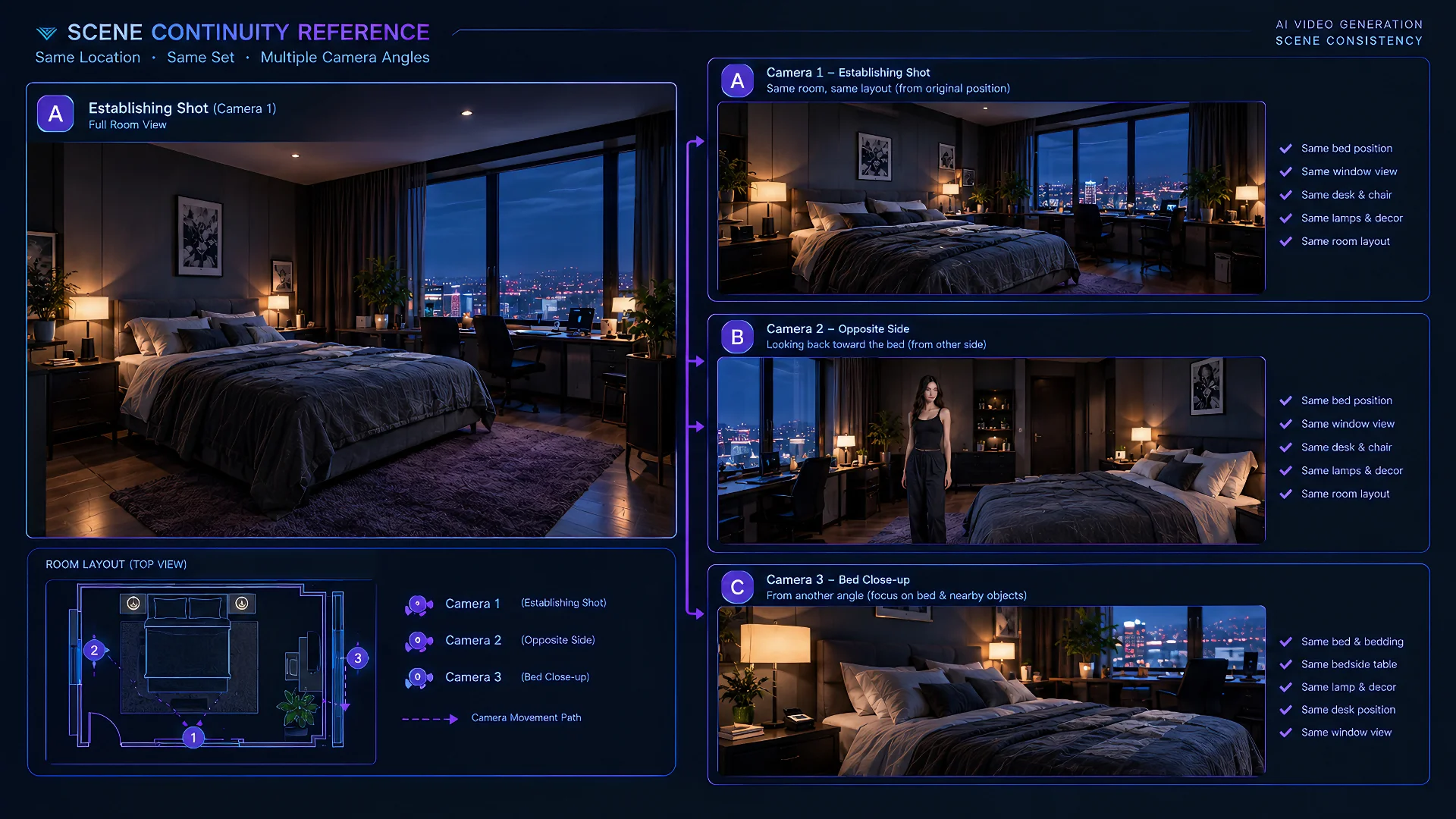
Location continuity is often treated as a prompt problem, but it is usually an asset problem. If every shot asks the image model to invent the same bedroom, studio, corridor, or exterior again, the architecture and object placement will change even when the wording remains similar.
Create one approved base image for each important location. It should establish the features that must survive across the sequence: room geometry, doors and windows, large furniture, important props, dominant materials, and the overall color and lighting logic. Decorative clutter that has no narrative purpose can remain flexible.
From that base, use Qwen-Image 2.1 to create controlled location variants such as a wider establishing view, a medium-shot background, a reverse angle, or a lighting change. These variants should still feel like different views of the same place, not newly invented rooms.
Characters can then be introduced into the approved location for shot-specific frames. When a person needs to stand near a particular object, leave through a visible doorway, or interact with furniture, define that spatial relationship in the still image before asking Wan to animate it. Video generation is more reliable when the opening frame already communicates where the action can happen.
Transparent RGBA assets can help when a subject or prop needs to be extracted, reused, or composited during preparation. They are production components, not finished Wan inputs. In most I2V workflows, place those transparent assets into a complete RGB composition first so Wan receives a coherent frame rather than an unresolved layer stack.
How to Create Wan I2V Keyframes With Qwen-Image 2.1
A beautiful image is not automatically a useful video keyframe. A Wan I2V keyframe must establish the shot clearly while leaving room for the requested movement to develop.
Start from the action, not from visual decoration. Ask what the first readable moment should be, what changes during the clip, and what the camera needs to see. Then use Qwen-Image 2.1 to assemble the approved character and scene assets into that opening state.
The most useful Qwen operations happen before motion generation:
- Build the composition. Place the correct character in the correct environment at the camera distance required by the shot.
- Establish the starting pose. The pose should precede the action rather than already showing its final result.
- Create movement space. Leave visible room in the direction the subject or camera is expected to travel.
- Repair local blockers. Correct hands, limbs, gaze direction, clothing boundaries, props, or contact points that could become unstable in motion.
- Match the target frame. Prepare the image at the aspect ratio and framing intended for the final video instead of cropping away important information later.
For example, if the planned action moves a subject from standing to sitting, the opening frame should not already show the completed seated pose. It should show a balanced starting position, the relevant furniture, and enough spatial separation for Wan to infer the transition. If the camera will push closer, the subject should not begin at an extreme close-up with nowhere for the camera to move.
Local editing is especially valuable here. A nearly correct image should not be discarded because one hand overlaps an object, the eyes face the wrong direction, or an important prop sits on the wrong side. Repair the affected region while preserving the approved composition. The goal is not a flawless standalone illustration; it is a stable and readable starting state.
Before sending the image to Wan I2V, check five things:
- The intended subject and action are immediately clear.
- Important limbs, faces, props, and contact points are visible.
- The frame contains space for the requested movement.
- No background object creates a misleading body boundary or duplicate shape.
- The prompt can focus on motion because the visual setup is already present.
If these conditions are not met, another video prompt usually will not solve the underlying image problem. Return to Qwen, correct the frame, and then generate motion.
Use Qwen-Image 2.1 Outputs as Wan I2V Keyframes or Wan 3.0 R2V References
The correct Wan route depends on what the Qwen image needs to preserve.
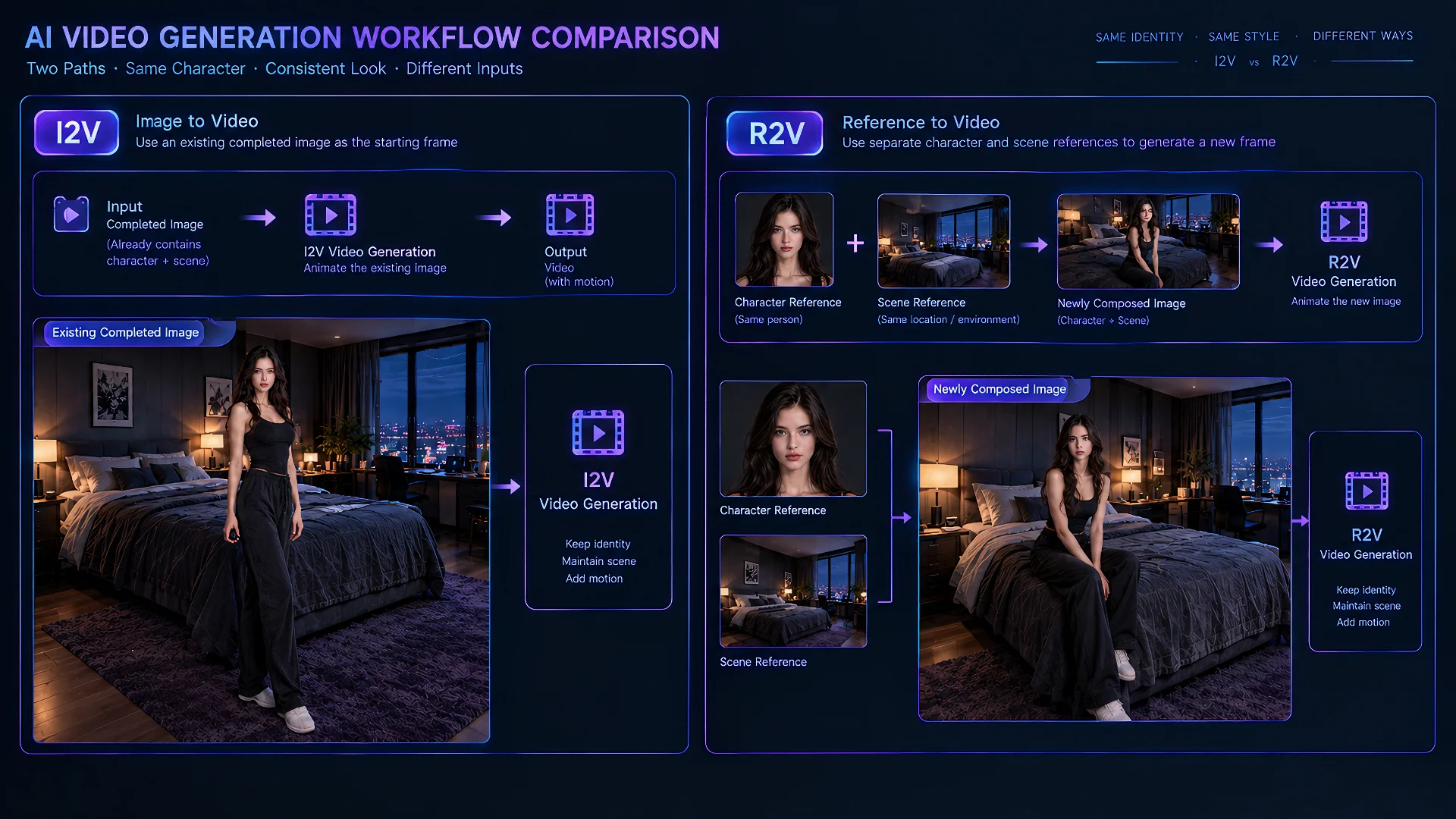
Choose Wan I2V when the Qwen output is already the intended opening frame. Its camera angle, character placement, environment, styling, and initial pose should remain visible in the generated video. The Wan prompt can then focus on movement, timing, camera behavior, and the intended end state instead of rebuilding the scene.
Choose Wan 3.0 R2V when the Qwen output provides reusable visual information rather than a fixed composition. A master character image can carry identity into a newly staged scene, while separate location or style references can guide the environment without forcing Wan to reproduce their original framing.
Decision shortcut
- Preserve the completed opening composition: use Wan I2V.
- Preserve the character, environment, or style while creating a new composition: use Wan 3.0 R2V.
Some Qwen outputs still require another preparation step:
- A character sheet containing several angles should be separated into clear views or used as a broader identity reference, not treated as one natural opening frame.
- An RGBA subject should usually be composited into the intended scene before I2V.
- A scene containing unresolved limbs, unclear contact, or conflicting characters should be repaired before either route.
- A storyboard can help plan a sequence, but each selected shot still needs its own clean input and motion direction.
This distinction also changes prompt writing. In I2V, avoid fighting the approved frame with a prompt that requests a different room, body orientation, or camera angle. In R2V, state what each reference contributes and describe the new scene explicitly. More references are useful only when each one solves a different control problem.
Preparing Qwen-Image 2.1 Assets for an NSFW Wan Workflow
NSFW video preparation places more pressure on identity separation, anatomy, contact, and occlusion than a simple portrait animation. The image stage should resolve as much visual ambiguity as possible before Wan has to interpret movement.
Separate Character Identities and Roles
When a shot contains multiple characters, each person should have a distinct master reference and a clear role in the scene. Use Qwen-Image 2.1 to establish who stands where, who initiates the movement, where each person is looking, and which clothing or visual traits belong to whom.
Do not overload the edit with several near-identical portraits and expect the model to infer ownership. If two references compete, create a cleaner combined frame in which the identities and positions are already readable. The Wan prompt can then concentrate on the interaction instead of trying to assign every visual feature during motion.
Make Bodies, Contact, and Occlusion Readable
Complex contact can fail when limbs disappear behind another body, hands merge with clothing, or the starting pose makes depth impossible to read. Before animation, inspect the image as a motion plan. Each visible limb should have a plausible owner, important joints should not be hidden without reason, and the direction of movement should be physically understandable.
Use local Qwen edits to repair ambiguous hands, separate overlapping silhouettes, simplify clothing edges, or reposition a prop. A simpler starting arrangement often produces a more convincing clip than an elaborate still whose anatomy is already unresolved.
Occlusion should also be intentional. If one character blocks a key action at the first frame, Wan has little evidence for what should happen behind that obstruction. Adjust the camera, spacing, or pose so the essential interaction remains readable. Detail can be added later; structural ambiguity is much harder to remove after generation.
Keep the Opening State Simple Enough to Animate
An NSFW keyframe does not need to display every intended action at once. Trying to encode the entire sequence in one still often creates crowded composition, tangled bodies, and contradictory motion cues. Stage the scene at the moment immediately before the principal movement, then ask Wan for one clear transition.
For longer sequences, divide the action into separate shots with approved end states. A completed clip can supply the visual basis for the next keyframe, but compare it with the master references before continuing. If identity or anatomy has drifted, repair the still in Qwen rather than allowing the error to propagate through the sequence.
The NSFW-specific preflight is short:
- Can each character be identified without relying on the prompt?
- Are body ownership, contact points, and depth relationships visually clear?
- Does the opening pose lead naturally into one primary action?
- Would removing one reference make the instruction clearer?
Passing this check does not guarantee perfect motion, but it removes several common failures before video generation begins.
Final Takeaway
Qwen-Image 2.1 adds the most value to a Wan workflow when it is treated as a visual preparation layer. It turns master character references, approved locations, poses, props, and local repairs into inputs that match a specific video task.
The production logic is straightforward: preserve identity through a master-and-branch asset system, build reusable locations instead of reinventing them, and solve composition problems before motion. Send complete opening frames to Wan I2V. Send reusable visual information to Wan 3.0 R2V when the new shot may reinterpret the composition.
For NSFW Wan production, the real gain is clearer control over identities, bodies, spatial relationships, and starting states. Qwen cannot guarantee that every Wan generation will succeed, but it can prevent the video model from inheriting avoidable ambiguity.
Start with one approved character, one reusable location, and one motion-ready keyframe. Test that small pipeline before expanding it into a full sequence.
If the opening composition is already complete, continue with the Wan I2V workflow. When separate references need to guide a newly staged scene, use Wan 3.0 NSFW. Creators who have not selected a route can compare the available Wan models before deciding how much visual control the shot requires.