
Wan 3.0 Reference to Video: What R2V Can Do, Why Results Fail, and How to Fix Them

Not every poor Wan 3.0 R2V result is the same kind of failure. A request may stop before generation because its references or settings conflict, or it may complete while losing identity, motion, audio, or NSFW prompt direction. The fastest way to fix it is to identify where the problem begins, then change only the source or instruction responsible instead of rebuilding the entire prompt.
What Is Wan 3.0 Reference to Video, and How Does R2V Work?
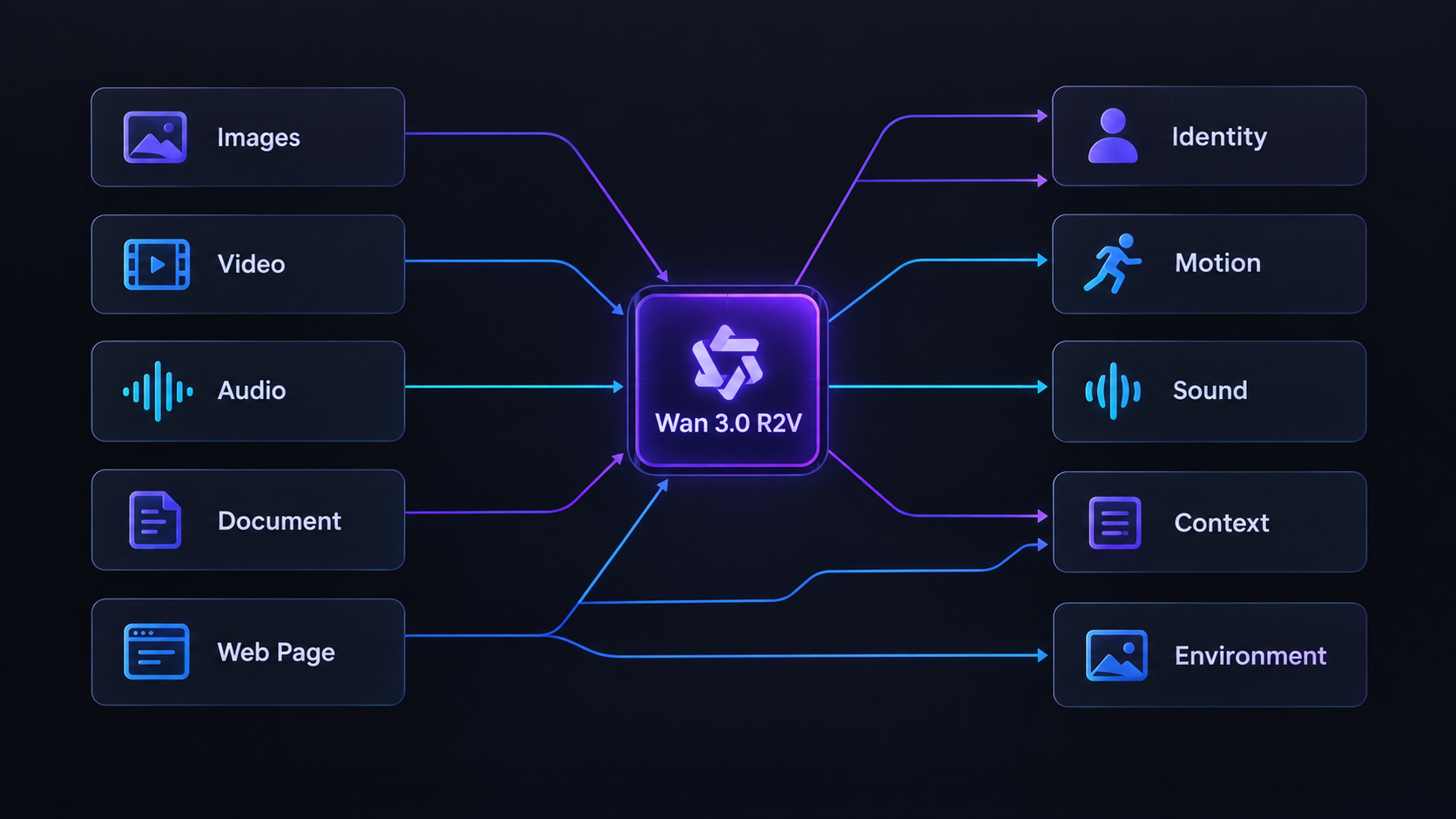
Wan 3.0 Reference-to-Video (R2V) generates a new video from a prompt and one or more reference assets. These references guide recognizable elements such as identity, motion, environment, style, or sound, so Wan does not have to infer everything from text alone.
Unlike I2V, where the source image becomes the opening frame, R2V uses source material as guidance without requiring the new video to begin from it. Creators assign each reference a role and describe the new scene in the prompt. In an NSFW Wan workflow, this can place a recurring NSFW character in different actions and settings while separate references guide motion or audio. References influence the result rather than permanently locking it, so clear roles matter more than additional files.
Which Reference Inputs Does Wan 3.0 Support, and What Does Each One Control?
Wan 3.0 supports reference images, videos, audio, documents, and public web pages. These inputs do not control the same part of a generation. Images mainly provide visual evidence, videos demonstrate movement, audio guides sound and timing, while documents and links supply broader creative context.
Wan interprets every reference through the prompt, so these inputs influence the result rather than locking it.
| Reference input | Current limit | Best used to guide |
|---|---|---|
| Reference images | Up to 10 | Character identity, appearance, wardrobe, objects, locations, composition, or visual style |
| Reference videos | Up to 5, with a combined duration of 15 seconds | Body movement, gestures, performance, camera behavior, pacing, or transitions |
| Reference audio | Up to 5, with a combined duration of 15 seconds | Voice characteristics, speaking rhythm, music, ambience, sound effects, or action timing |
| Document | One file | Scripts, storyboards, character descriptions, shot plans, or structured creative briefs |
| Public web page | One link | Publicly accessible story, product, campaign, or visual context |
A reference image can define what a subject, object, environment, or style should look like without becoming the opening frame. Several images may provide different views of the same subject, but they should agree on the features that matter.
A reference video can demonstrate an action or camera movement that is difficult to describe precisely with text. Wan interprets the relevant motion rather than copying the source frame by frame.
A reference audio file can guide voice, rhythm, ambience, or the timing of visible events. It can therefore influence how a scene develops, not merely provide a soundtrack after generation.
Documents and public web pages work differently. They give Wan written or visual context for the broader brief, but they are less precise than an image for identity or a video for movement. A document and web link cannot be used together in the same request, although either can be combined with image, video, and audio references.
What Can You Create With Wan 3.0 R2V in an NSFW Workflow?
Wan 3.0 R2V is useful when an NSFW project needs to preserve recognizable creative elements while changing the action, setting, or composition.
Reuse an NSFW Character in New Scenes
A recurring NSFW character or creator persona can appear in different locations, actions, and camera setups without requiring the reference image to become the opening frame. This makes R2V suitable for related clips built around the same recognizable identity.
Direct Multi-Character and Performance-Led Scenes
Separate characters can be brought into one scene from individual sources. Movement, camera behavior, voice, music, or timing can also guide the performance, making R2V useful when text alone cannot describe the intended result clearly.
Build Connected Clips From One Creative Direction
Creators can reuse the same character, styling, environment, or tone across several generations while changing the story beat in each clip. This supports an uncensored Wan 3.0 workflow built around a recurring persona, scene series, or consistent visual identity.
The main benefit is not simply producing one spicy AI video. It is giving related outputs a shared creative direction without forcing every clip to begin from the same composition.
How to Build a Wan 3.0 Reference Set the Model Can Actually Follow
A useful Wan 3.0 reference set is the smallest collection of sources that removes uncertainty from the scene. Every important decision should have one clear source of truth.
1. Define the Result and Assign Reference Roles
Describe the intended output in one sentence before choosing files:
A recurring NSFW character performs a new action in a different setting while maintaining the same recognizable identity and visual style.
Then assign each necessary source a responsibility:
- Image 1 owns character identity.
- Image 2 supports another view of the same character.
- Image 3 owns wardrobe or styling.
- Image 4 owns the environment.
- Video 1 owns body movement or camera behavior.
- Audio 1 owns voice, rhythm, or timing.
Several references may support the same decision, but they should agree. Use one primary owner for each character, movement, environment, or sound direction.
2. Choose Clear, Compatible Sources
Select references in which the intended information is easy to identify. A character source should show recognizable features without unrelated subjects or heavy obstruction. A motion source should contain one readable action rather than several cuts. An audio source should make the intended voice, rhythm, or sound cue clear.
Before generating, check for conflicts such as:
- Different appearances assigned to the same character
- An environment image containing another prominent person
- A motion reference that conflicts with the requested camera direction
- Audio pacing that does not fit the planned scene
If two sources disagree, choose which one has priority or remove the weaker reference.
3. Separate What Must Stay From What May Change
Divide the brief into three groups:
Must preserve:
Identity-defining features, hairstyle, body appearance, signature wardrobe, accessories, product geometry, or voice characteristics.
May change:
Pose, action, expression, environment, lighting, framing, or camera angle.
Do not inherit:
Unwanted backgrounds, people, clothing, text, music, poses, or camera movement already present in a reference.
This prevents Wan 3.0 from treating every visible or audible detail as part of the intended result.
4. Build a Compact Reference Brief
OUTPUT GOAL: Describe the intended video in one sentence.
IMAGE 1: Primary owner of character identity.
IMAGE 2: Supporting view of the same character.
IMAGE 3: Owner of wardrobe, styling, or environment.
VIDEO 1: Owner of body movement or camera behavior.
AUDIO 1: Owner of voice, rhythm, or timing.
MUST PRESERVE: List the details responsible for continuity.
MAY CHANGE: List what Wan can reinterpret in the new scene.
DO NOT INHERIT: List unwanted subjects, backgrounds, sounds, or visual traits.
NEW SCENE: Describe the action, setting, camera direction, and timeline.Use the asset labels shown by the current interface.
5. Test the Minimum Reference Set
Begin with the primary character reference and one simple action. Add movement, environment, styling, and audio only after the basic generation follows its assigned sources.
For related NSFW clips, reuse the approved reference set and preservation instructions. Change only the scene elements required for the next output. If the result becomes worse after adding a source, the new reference is the first place to check.
Why Wan 3.0 Reference Results Fail, and How to Fix Each Problem
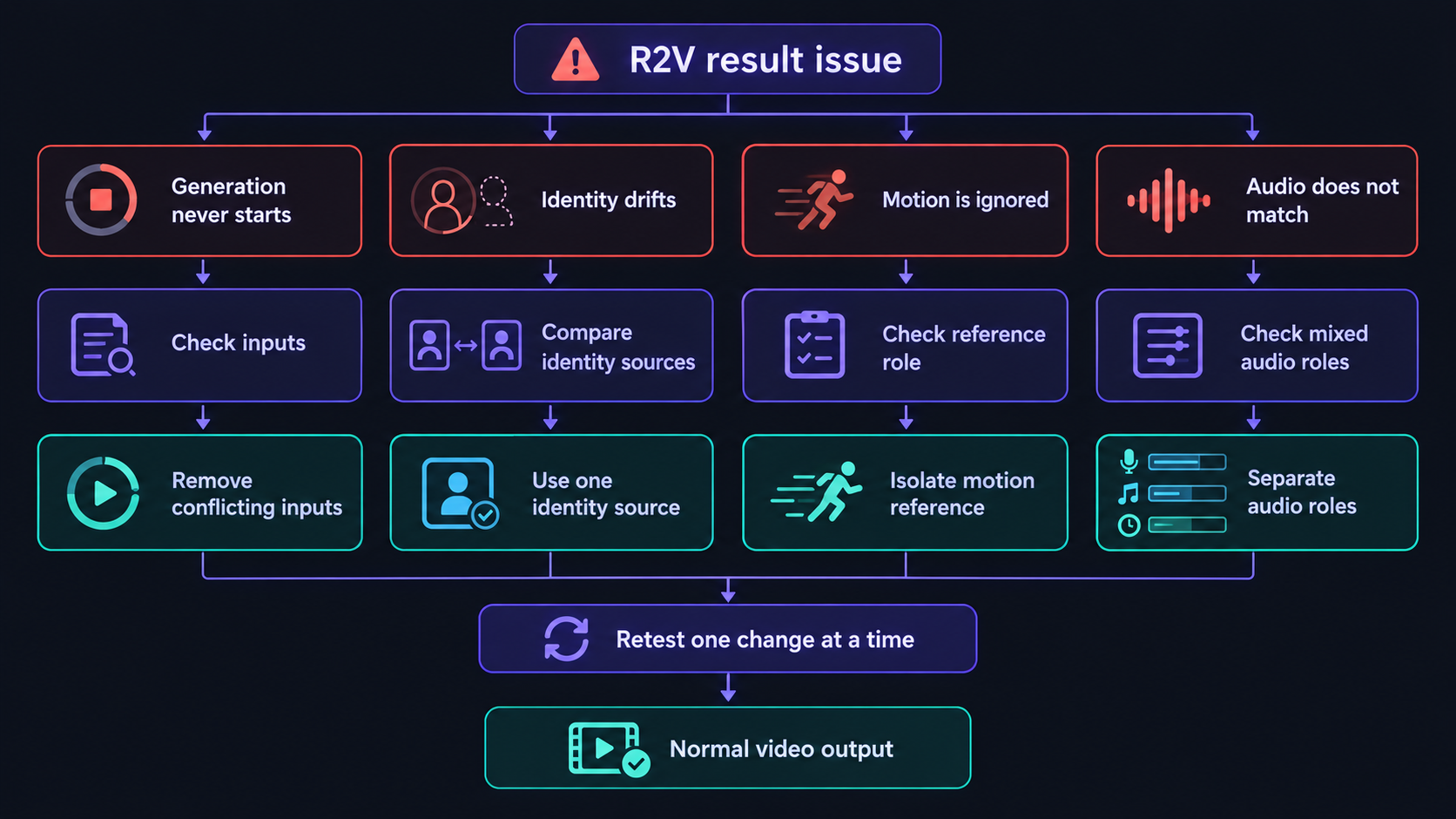
Not every failed Wan 3.0 reference result has the same cause. First identify where the workflow breaks:
- Generation never starts: check inputs, duration, file compatibility, and service status.
- Generation completes but ignores a reference: check labels and reference responsibilities.
- Identity or motion changes during the clip: reduce ambiguity and scene complexity.
- Only the NSFW direction is rejected or omitted: distinguish platform moderation from model prompt adherence.
Problem 1: Why Your Wan 3.0 Reference Request Fails Before Generation
Why it happens: Wan 3.0 accepts many input types, but only specific combinations are valid. Common conflicts include:
- Combining first-frame or first-and-last-frame inputs with R2V references
- Uploading a document and web link together
- Exceeding the reference limits
- Using videos with a combined duration above 15 seconds
- Making input video duration plus output duration exceed 30 seconds
- Uploading an unsupported, damaged, or inaccessible file
- Using reference labels the current interface does not recognize
Fix: Reduce the request to one reference image and a short output. Remove other media, frames, documents, and links. If that works, restore one input at a time. If the minimal request also fails, test a newly exported file and check whether the service is experiencing a temporary upload problem.
Problem 2: Wan 3.0 Ignores a Reference
Why it happens: Uploading a file does not tell Wan which part of it matters. A single image may contain identity, wardrobe, pose, background, lighting, and style. If the prompt only says “use the references,” Wan must choose which details to prioritize.
Fix: Name the source and assign one responsibility:
Image 1 defines character identity.
Image 2 defines wardrobe only.
Video 1 controls body movement, not appearance.
If one source is still ignored, test it alone. A reference that cannot guide a simple scene is unlikely to become clearer after more inputs are added.
Problem 3: The Character Looks Similar but Not Identical
Why it happens: One image cannot show every angle, expression, or hidden feature. Wan must invent missing information when the character turns, moves away from the camera, changes expression, or becomes obstructed.
Drift also becomes more likely when supporting images disagree, the face is too small, or the scene combines long duration with complex movement.
Fix: Use one clear primary identity image and add only consistent supporting views. State which distinguishing traits must remain recognizable. Test the NSFW character with moderate framing and simple motion before introducing rapid turns, occlusion, or complicated interaction.
Problem 4: Multiple Images Become Separate Shots or Characters
Why it happens: Several views of the same character can resemble a storyboard or a group of different subjects. Wan may use them sequentially instead of combining them as identity evidence.
Fix: Explain their relationship before describing the scene:
Images 1, 2, and 3 show the same NSFW character from different angles. Use them together to define one identity. Do not introduce multiple versions of the character.
Choose one primary image and describe the others as supporting views. Use a single continuous shot for the first test so that reference interpretation is easier to evaluate.
Problem 5: Characters Exchange Faces, Bodies, Clothing, or Actions
This behavior is commonly called identity bleed.
Why it happens: Generic labels and pronouns become ambiguous when several subjects move or interact. Similar appearances, overlapping positions, and references containing more than one prominent person increase the confusion.
Fix: Give every subject one permanent label and stable position:
Character A from Image 1 remains on the left.
Character B from Image 2 remains on the right.
Character A completes the first action before Character B responds.
Use the same labels for movement and dialogue. Establish a simple composition before adding position changes, crossed movement, or heavy occlusion.
Problem 6: The Reference Video Does Not Control the Intended Motion
Why it happens: A video contains several possible signals: identity, body movement, camera behavior, setting, lighting, pacing, and sound. “Follow Video 1” does not tell Wan which signal matters.
The prompt may also request movement that conflicts with the reference.
Fix: Isolate the intended role:
Video 1 controls body movement and timing only. Use identity from Image 1. Do not copy the subject, wardrobe, or environment from Video 1.
Trim the source to the relevant action and avoid clips with several cuts. Use similar framing when possible: a full-body reference is more useful for body movement than a heavily cropped source.
Problem 7: The Action Stops Before the Clip Ends
Why it happens: When the reference motion ends, Wan must invent what happens next. Without a timeline, it may hold the final pose, repeat movement, or fill the remaining seconds with low-information action.
The documented duration rule also requires input video time plus generated output time to remain within 30 seconds.
Fix: Keep the output close to the useful reference length or define the remaining timeline:
0–5 seconds: follow the motion from Video 1.
5–10 seconds: complete the movement and turn toward the camera.
10–15 seconds: hold the final position as the camera pulls back.
For a longer sequence, generate the key action first and handle the next stage as a separate clip, edit, or continuation.
Problem 8: Wan Copies an Unwanted Background, Outfit, or Style
Why it happens: Wan sees the complete reference, including details the creator may consider irrelevant. Unless the prompt separates important evidence from incidental content, both remain possible parts of the result.
Fix: Add exclusions beside each assignment:
Image 1 defines identity only. Do not inherit its background or pose.
Image 2 defines wardrobe only. Do not copy its face.
Video 1 defines camera movement only. Do not copy its subjects.
Whenever possible, use a cleaner reference instead of relying on a long list of exclusions.
Problem 9: Reference Audio Does Not Match the Scene
Why it happens: One audio file may contain voice, dialogue, music, ambience, and timing simultaneously. Wan may not know whether it should guide the speaker, soundtrack, or movement.
Fix: Assign one audio responsibility at a time:
Audio 1 defines Character A’s voice characteristics.
Audio 2 controls the scene’s rhythm and background music.
Use a clean sample with one speaker when voice consistency matters. Separate music from voice when they perform different jobs, and state directly when the scene should contain no dialogue or background music.
Problem 10: The NSFW Prompt Is Rejected or the Requested Action Disappears
A rejected request and a completed but inaccurate video are different problems.
A rejection before generation may come from invalid inputs, a temporary service failure, or moderation applied by the platform hosting Wan.
A completed video with missing NSFW direction may indicate weak prompt adherence, conflicting references, excessive scene complexity, obstruction, or platform-side prompt rewriting.
Use the point of failure to diagnose it:
- Every request fails: check service and file status.
- One media combination fails: check the documented input rules.
- Only certain content is rejected before generation: check platform moderation.
- The video completes but follows the wrong action: simplify the scene and reference roles.
- Identity works but motion fails: isolate the motion reference.
On NSFWWan, Wan 3.0 R2V is provided through a fully uncensored workflow for permitted NSFW content. Uncensored access removes a platform restriction; it does not eliminate technical limits involving motion, anatomy, occlusion, identity separation, or prompt adherence.
Wan 3.0 R2V vs I2V vs T2V: Which Mode Should You Use?
The best Wan 3.0 mode depends on what source material you have and what must remain under your control. R2V is not automatically better because it accepts more references. Use the simplest mode that preserves the information your video needs.
| Mode | Starting point | What it controls best | Best suited to |
|---|---|---|---|
| T2V | A text prompt | Idea, action, setting, style, and camera direction | Creating a scene without a fixed character or composition |
| I2V | A first frame or first-and-last frames | Opening composition, subject appearance, and layout | Animating an existing image or controlling its transition |
| R2V | Reference media | Reusable identity, motion, environment, style, and audio | Building a new scene without using the references as its opening frame |
Choose R2V When References Should Guide a New Scene
R2V is the strongest fit when you need to:
- Reuse an NSFW character without preserving the original composition
- Combine separate character, environment, motion, or audio sources
- Build a new scene from several independent references
- Maintain a recognizable creative identity across related clips
Use NSFWWan T2V when Wan should invent the scene, NSFWWan I2V when an image should become the opening composition, and NSFWWan R2V when existing sources should guide a new result. More references are useful only when each one solves a clear control problem.